
 Login
Login Register
- Game Servers
- Minecraft
- Garrys Mod
- Rust
- Conan Exiles
- Arma 3
- ARK
- CS:GO
- TF2
- Unturned
- Blackwake
- Mordhau
- Factorio
- Space Engineers
- Valheim
- Virtual Dedicated
- General
- Game Servers
Want your own server? View our games!
Enabling GSLT (Steam Game Server Login Token)
GSLT is a feature that was added in the 2015 update of Garry's Mod. This addition had no real affect other than allowing clients to connect after changing IP addresses.
With the latest May 2020 update this has changed, all servers that do not have a GSLT (Steam Game Server Login Token) will be penalized in the server rankings. Because of this, we suggest all users enable this immediately.
Enabling this on your server is very simple, just follow the below guide
Step 1 - Creating your token
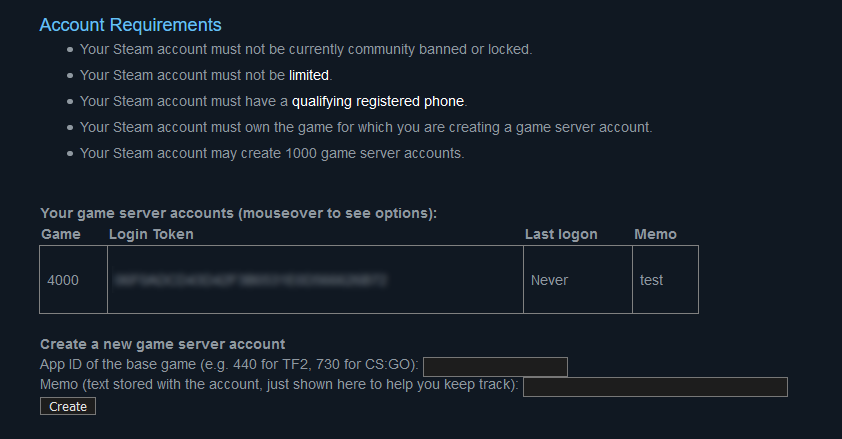
- Head to the following URL and login;
https://steamcommunity.com/dev/managegameservers
- Enter the AppID as 4000
- Enter a description/memo to identify your server, this can be anything you want
- Click "Create"
- You should now see your token, select and copy this
Step 2 - Enabling your token
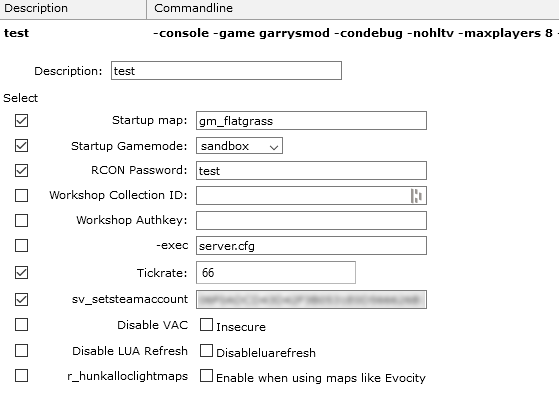
- Navigate to your server control panel
- Select Command Line Manager
- Select Custom Command Lines
- Create a new command line or edit an existing one
- Tick the left hand box for every line you wish to enable
- Enter the token we copied at the end of Step 1
- Click Save and make sure to Select your command line.
- Navigate to your server control panel
- Select Command Line Manager
- Select Custom Command Lines
- Create a new command line or edit an existing one
- Tick the left hand box for every line you wish to enable
- Enter the token we copied at the end of Step 1
- Click Save and make sure to Select your command line.
Your server should now be registered and ready to use, you will see that your server begins to be ranked higher than any servers that do not have this enabled.